

GPU Effects
GPU effects are Arkestra’s built-in hardware-accelerated effects. Unlike ISF shaders — which run a fragment program per pixel — GPU effects use Metal compute pipelines, multi-pass rendering, frame ring buffers, codec encode/decode sessions, or other heavier GPU work that isn’t practical inside an ISF shader. That extra power comes with a proportionally higher GPU and CPU cost, so use them with awareness when stacking multiple effects on busy tracks.
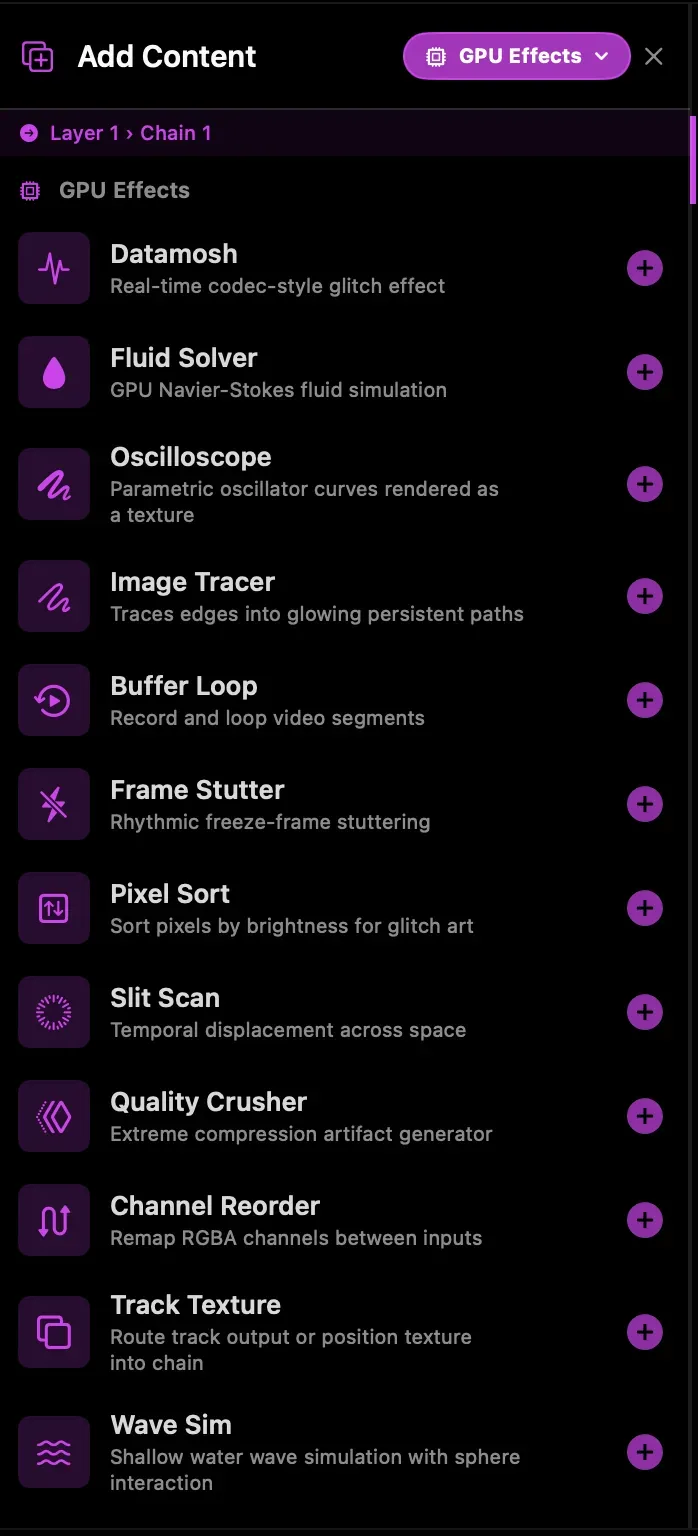
You find GPU effects in the Add Content browser under the GPU Effects category. They load into a chain slot just like any ISF effect.
Datamosh
Section titled “Datamosh”Produces real codec-level glitch artifacts by running video through an H.264 VideoToolbox encode/decode pipeline and suppressing I-frames (keyframes). Without fresh reference frames, the decoder’s motion compensation applies old motion vectors to stale pixel data, causing the characteristic smear and pixel-bleeding look of datamosh.
Why it’s heavy: maintains two VT compression sessions (motion encoder + pixel encoder) and a decompression session simultaneously. Each frame involves H.264 encode, NAL manipulation, and async decode on the hardware video codec. Texture bridging between OpenGL and CVPixelBuffer via IOSurface adds per-frame work.
| Parameter | What it does |
|---|---|
| Quality | H.264 encoder quality (low = more compression artifacts) |
| Bloom | Replays the same P-frame through the decoder N extra times, accumulating smear on each pass |
| Refresh | Momentary — forces a fresh I-frame into the decoder, resetting the reference frame |
| Mosh | Toggle freeze/smear. Off = shows live input; on = feeds decoder output back |
| Motion Source | Optional secondary track to donate motion vectors instead of the primary input |
| Swap Motion | Toggle between primary and Motion Source for motion vectors |
Slit Scan
Section titled “Slit Scan”Displaces rows (or columns) of the output so each row samples from a different point in a frame history buffer. Rows at the top sample recent frames; rows at the bottom sample older ones, creating time-smearing and panoramic stretching effects.
Why it’s heavy: maintains a ring buffer of up to 60 frames as a texture2d_array, with Metal compute doing the per-row time-offset compositing every frame.
| Parameter | What it does |
|---|---|
| Buffer Depth | How many frames of history to store (2–60 frames) |
| Speed | Rate at which the time offset animates across the image |
| Direction | Vertical (rows displaced) or horizontal (columns displaced) |
Image Tracer
Section titled “Image Tracer”Detects edges in the input using a Sobel shader, runs a GPU marching-squares pass to extract contour segments, then tracks and smooths those contours as persistent glowing paths rendered with Metal. Supports two simultaneous threshold levels for layered fine/bold edges.
Why it’s heavy: each frame involves an ISF edge detection render, a Metal compute kernel (marching squares), CPU path engine updates, and a Metal line renderer composited back to an OpenGL texture. The CPU trace pipeline runs on a background thread and is pipelined with the render to avoid blocking, but the GPU work still adds up on high-resolution output.
| Parameter | What it does |
|---|---|
| Threshold 1 / 2 | Edge detection sensitivity for the two trace levels |
| Fade Second | Opacity of the second (fainter) trace level; set to 0 to run only one level |
| Smoothing | EMA smoothing applied to path positions over time |
| Max Paths | Maximum number of simultaneous active contour paths (1–128) |
| Decay Rate | How quickly inactive paths fade out |
| RDP Epsilon | Ramer–Douglas–Peucker simplification — higher values remove more intermediate points |
| Points Per Path | Max resampled points stored per path in the GPU buffer (4–64) |
| Glow Intensity | Brightness multiplier for the rendered lines |
| Glow Color | Base HSV color for traced paths |
| Pixel Mix | Blend between Glow Color and the source pixel color at each path’s centroid |
| Composite | Render paths over black, or composite over the source image |
Pixel Sort
Section titled “Pixel Sort”Sorts pixels within each row or column by brightness, rearranging image content into the characteristic vertical or horizontal streaks of glitch art pixel sorting. A threshold limits sorting to only bright (or dark) areas, leaving the rest of the image intact.
Why it’s heavy: uses a multi-pass bitonic sort network in a Metal compute shader — sorting is inherently serial per row/column and requires multiple passes to complete.
| Parameter | What it does |
|---|---|
| Threshold | Brightness threshold; only pixels above this value are sorted |
| Intensity | Blend between sorted and original output |
| Direction | Sort rows (horizontal) or columns (vertical) |
Fluid Solver
Section titled “Fluid Solver”A full GPU Navier-Stokes fluid simulation, ported from Evan Wallace’s WebGL Water. Maintains advection, diffusion, and divergence fields in separate Metal compute passes. Can output height/normal maps, velocity flow fields, or displacement data for use in 3D chains.
Why it’s heavy: runs multiple full-screen compute passes per frame (advect, diffuse, pressure solve, gradient subtract). Output resolution directly scales the cost.
Output modes include Height (height + normals as RGBA), Velocity (RGB flow field for particle systems), and Displace (normal.xz + height encoded for 3D displacement chains).
Buffer Loop
Section titled “Buffer Loop”Records a window of frames into a ring buffer and loops them. With Loop off, the buffer rolls continuously (nothing is frozen). Triggering Grab captures the current window and starts looping it. Loop length can be set freely or locked to a beat division.
Why it’s heavy: allocates and manages a VVBuffer ring buffer sized by loop length × frame resolution.
| Parameter | What it does |
|---|---|
| Length | Loop length in frames (free mode; hidden when BPM sync is on) |
| BPM Sync | Lock loop length to the selected beat division |
| Loop | Toggle between live passthrough and frozen loop playback |
| Grab | Momentary — record a fresh window and begin looping |
Frame Stutter
Section titled “Frame Stutter”Freezes the current frame for a set number of ticks, then snaps to live input. Creates rhythmic strobe and stutter effects. Can be synced to BPM with a beat division for musically locked stuttering.
| Parameter | What it does |
|---|---|
| Hold Length | How long to freeze (1–30 frames; free mode only) |
| Probability | Chance of actually triggering a freeze on each interval (0–1) |
| BPM Sync | Lock stutter timing to the selected beat division |
Quality Crusher
Section titled “Quality Crusher”Runs the input through H.264 encode/decode at extremely low quality settings, introducing heavy macroblocking, banding, and compression artifacts. Unlike Datamosh, keyframes are never dropped — this is pure codec degradation. An optional double-encode pass applies the compression twice for more extreme destruction.
Why it’s heavy: like Datamosh, it maintains VideoToolbox encode/decode sessions. Lower quality settings can push the codec harder.
Wave Sim
Section titled “Wave Sim”A shallow water wave simulation (discrete spring PDE) that responds to a virtual sphere moving through the surface. Can output height/normal data, a velocity flow field for particle systems, or displacement data for 3D tracks. Physics are computed each frame in Metal compute.
Oscilloscope
Section titled “Oscilloscope”Renders parametric oscillator and Lissajous curves as a texture using a Metal line renderer. Useful as a generator-style insert at the start of a chain to feed subsequent effects with geometric waveforms.
Channel Reorder
Section titled “Channel Reorder”Remaps individual RGBA output channels from selectable input sources. Equivalent to TouchDesigner’s Reorder TOP. Uses a Metal compute shader for per-pixel channel routing.
Tonemap
Section titled “Tonemap”Compresses HDR (over-range, above-1.0) chain values into a displayable 0–1 range. Generators, feedback loops, and additive blends can produce values brighter than 1.0 that a normal display simply clips — drop a Tonemap at the end of an HDR chain to roll those highlights off smoothly instead of blowing them out.
Adding a Tonemap effect automatically promotes the upstream chain to 16-bit float (RGBA16F) rendering, so over-range values survive all the way to the tonemap node without any manual track setting. The output is always 8-bit, since the result is display-referred.
| Parameter | What it does |
|---|---|
| Operator | Tone-mapping curve — ACES, Reinhard, Hable, or Clamp |
| Exposure | Exposure offset applied before tonemapping; the center position is neutral (0 EV), spanning roughly −4 to +4 EV |
| White Point | Luminance level that maps to full white, on a 1–8 scale (used by Reinhard and Hable) |
| Linearize | Linearizes gamma-encoded input before tonemapping and re-encodes afterward |
Track Texture
Section titled “Track Texture”Routes another track’s render output (or 3D position texture) directly into the current chain. Enables cross-track texture routing and feedback-style setups without Syphon.
Vision Overlay
Section titled “Vision Overlay”Overlays Vision framework tracking data — face landmarks, hand skeleton, or body pose — onto the input texture. Reads live tracking data from Arkestra’s Vision tracker each frame and renders the skeleton or mesh on top of any source.
Performance notes
Section titled “Performance notes”GPU effects can stack, but each one adds real workload. A few things to keep in mind:
- Datamosh and Quality Crusher each maintain active VideoToolbox codec sessions. Running several simultaneously can saturate the hardware encoder/decoder.
- Image Tracer runs a CPU trace pipeline concurrently — it’s pipelined to avoid stalls, but high path counts (
Max Paths) and fine details (Threshold, lowRDP Epsilon) increase CPU time. - Fluid Solver and Wave Sim scale with output resolution. Running them at 1080p+ on a busy scene is noticeably heavier than at 720p.
- ISF effects by comparison are single-pass fragment shaders with minimal overhead — prefer them for simple colour or distortion work and reach for GPU effects when you specifically need the temporal or simulation behaviour they offer.