

Chain Snapshots
Chain Snapshots are parameter presets for a single chain. Dial in a look, save it to a slot, dial in another, save that too. You can then switch between them at any time — instantly or with a smooth crossfade.
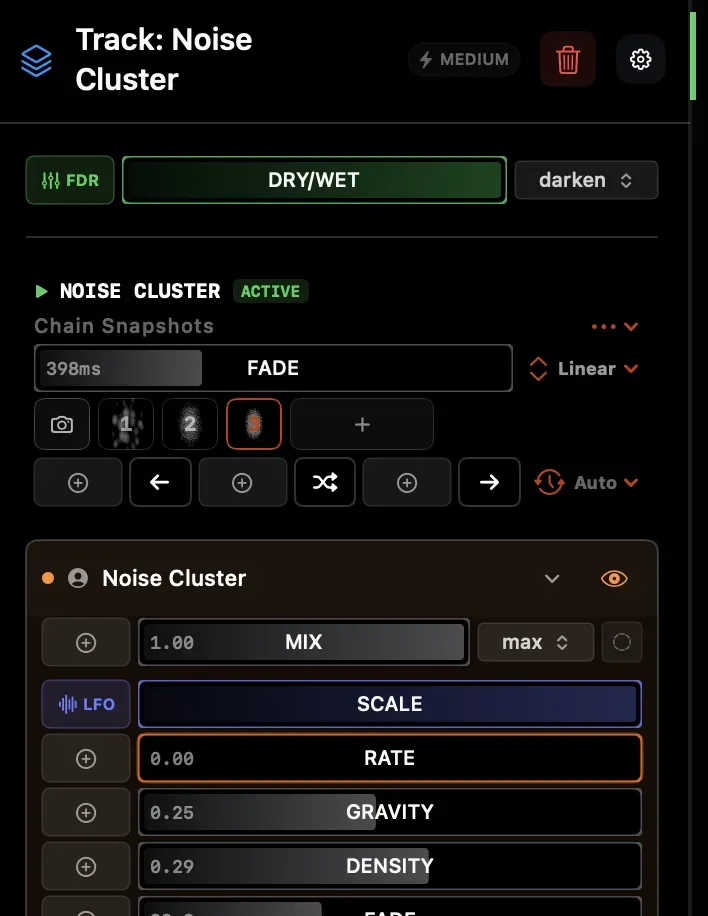
Each chain has 8 slots. Each slot stores every parameter value in the chain: effect settings, enabled/disabled state, and dry/wet mix.
Think of them like preset buttons on a synth — A, B, C — except for a visual effect chain.
When to use chain snapshots
Section titled “When to use chain snapshots”- You want to toggle between a subtle and an intense version of the same chain mid-set
- You have a chain with lots of parameters and want to save a few “looks” to jump between
- You want to autoplay through states on a beat-sync schedule for evolving visuals
- You want to crossfade smoothly between two completely different effect configurations
For switching entire effect stacks, use Scenes → (which switch the active chain on a track). For saving the full state of the whole project, use Snapshots →.
Enabling the snapshot bar
Section titled “Enabling the snapshot bar”Chain Snapshots are hidden by default. To show them, open the track inspector and enable Chain Snapshots in the settings section. A row of numbered slots appears below the chain name.
Saving a snapshot
Section titled “Saving a snapshot”Click the + button at the left of the snapshot bar to save the current chain state into the next empty slot. The slot shows a small thumbnail of the chain output at that moment.
Recalling a snapshot
Section titled “Recalling a snapshot”Click any filled slot to recall it. All parameters jump to the stored values immediately — or crossfade if a fade duration is set.
Fade transitions
Section titled “Fade transitions”The Fade slider in the snapshot bar header controls transition length — from instant up to 5 seconds. The easing curve (Linear, Ease In/Out, Cubic In/Out, Expo In/Out, Bounce) is selectable from the dropdown next to the slider.
Non-interpolatable state (effect enabled/disabled, media selection, texture routing) is applied at the start of the fade so the new source is already loaded when the crossfade completes.
Updating a slot
Section titled “Updating a slot”Right-click a slot → Overwrite with Current State to replace it. You can also enable Autosave (⋯ menu in the header) — when active, switching away from a slot automatically saves the current chain state back into it before loading the new one.
Naming slots
Section titled “Naming slots”Right-click a slot → Rename to give it a meaningful label (e.g. “Calm”, “Full Blast”). The label replaces the slot number in the bar.
Deleting a slot
Section titled “Deleting a slot”Right-click → Delete Snapshot.
MIDI / modulation trigger
Section titled “MIDI / modulation trigger”Right-click a slot → MIDI Learn (or use the mapping options) to assign a pad, button, or any boolean source. The snapshot restores on every rising edge of that trigger.
Navigation controls
Section titled “Navigation controls”Below the slot row, three buttons let you step through filled slots:
| Button | Action |
|---|---|
| ← | Restore the previous filled slot |
| ⇄ | Restore a random filled slot |
| → | Restore the next filled slot |
All three are mappable to MIDI or any boolean modulation source.
Autoplay
Section titled “Autoplay”The Auto menu cycles through snapshots on a beat-sync schedule. Choose a bar division (32, 16, 8, 4, 2, 1 bars, or note subdivisions down to 1/16) and Arkestra advances to the next filled slot on every interval. Set to None to disable.
Chain Snapshots vs Scenes vs Project Snapshots
Section titled “Chain Snapshots vs Scenes vs Project Snapshots”| Chain Snapshots | Scenes | Project Snapshots | |
|---|---|---|---|
| Scope | One chain | All tracks | Entire project |
| Slots | 8 | Unlimited | 32 |
| What’s stored | Effect parameters, enabled state, dry/wet | Active chain per track | Everything |
| Fade transition | ✅ Yes (0–5s) | — | — |
| Restore speed | Instant or faded | Instant | Async |
| Use for | Parameter presets on one chain | Section switching | Project checkpoints |